R3PLICA
AI in your design workflow

Catalog. Scene. AI.
One conversation.

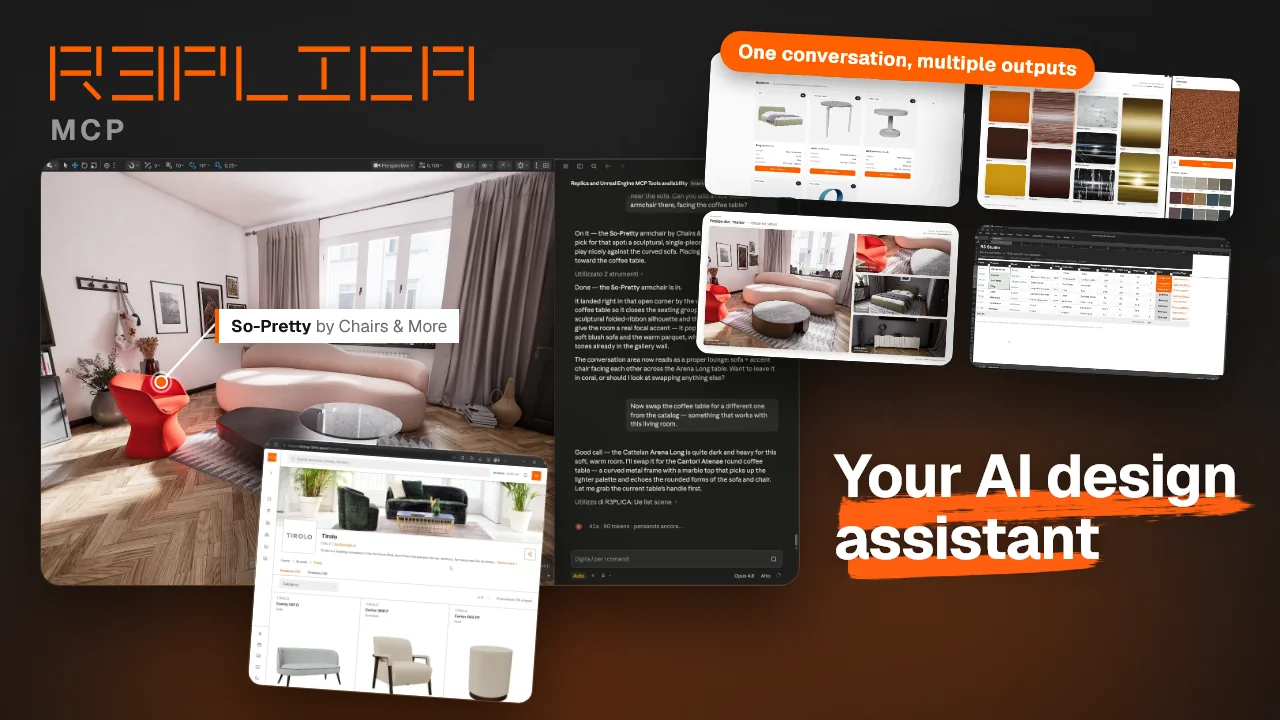
Connect Claude, Cursor or any MCP-compatible assistant to R3PLICA. Mix catalog data with what's in your scene — let your AI summarize, find alternatives, generate dashboards, or place new pieces directly. In natural language.

R3PLICA AI Connector demo
Setup

Connect to R3PLICA

Config file unlocks the full experience: catalog plus live scene integration. Custom connector is the easiest start.

What is MCP?

Model Context Protocol is the open standard that lets AI assistants talk to external tools and data. Once you connect R3PLICA, your assistant gains access to the catalog and — with the plugin — your scene, natively in any conversation.

Your data, where it stays

Catalog requests go through R3PLICA's edge — public data. Your scene runs over localhost, so R3PLICA never sees it. Only what you ask your assistant to act on — a screenshot, a product list — reaches your AI provider, under its own data policy.

Installs the R3PLICA MCP locally. Auto-discovers the Unreal Engine plugin so Claude sees and interacts with your scene. The full R3PLICA experience.

  1. Install the MCP (Node.js 20+ required):
    npm install -g r3plica
  2. Add to your claude_desktop_config.json:
    {
      "mcpServers": {
        "R3PLICA": {
          "command": "r3-mcp"
        }
      }
    }
  3. Restart Claude Desktop. Open Unreal Engine with the R3PLICA plugin to unlock scene-aware tools.
  • Catalog + AI
  • Unreal scene
  • Cross-device

The easiest start. No install, works on any machine with Claude Desktop. Catalog and AI workflows — no scene integration.

  1. In Claude Desktop: Settings → Customize → Connectors → + → Add custom connector
  2. Name: R3PLICA
  3. Server URL:
    https://mcp.r3plica.space/mcp
  • Catalog + AI
  • Cross-device
  • Unreal scene

For Claude Code and other terminal-based AI agents. Note: Claude Code and Claude Desktop have separate MCP configs.

claude mcp add --transport http --scope user r3plica https://mcp.r3plica.space/mcp
  • Catalog + AI
  • Unreal scene
Want scene integration too? Install the MCP (npm install -g r3plica) and register the local binary instead of the remote bridge:
claude mcp add r3plica --scope user -- r3-mcp
Same Unreal scene awareness as the Config file path.
  • Catalog + AI
  • Unreal scene
  • Cross-device
Want the leanest path? Skip MCP entirely. Install the R3PLICA CLI globally and let the agent call r3 directly via its shell tool — no protocol overhead, no tool registry, full output visibility in your terminal.
npm install -g r3plica
Drop this CLAUDE.md into your project so the agent knows the full command surface.
What you can ask

Try these prompts

Copy any prompt, paste it into your assistant, see what happens. Examples are written for the R3PLICA plugin for Unreal Engine, but most also work standalone against the catalog.

Scene summary
"Summarize everything I have in this scene."
"Which brands and designers are represented?"

Brand-and-category recap, in seconds.

Spec sheet
"Generate a spec sheet for every product in the scene, with dimensions, finishes and designer."

A tidy table, ready for client decks.

Alternatives in context
"Find me 3 alternatives to this sofa in the R3PLICA catalog."
"Suggest a minimal armchair that would sit well next to this table."

Matched on category, dimensions and vibe.

Finish control
"Which finishes are available for this chair?"
"Show me every upholstery option for this sofa."

Every variant in the catalog for the piece you point at.

Brand swap
"The client only approved Montbel and Miniforms. Swap every piece from other brands with an equivalent."

Replaces off-list pieces, with your confirmation.

Custom documents
"Generate an HTML dashboard for this project, with product cards, floor plan and finish palette."
"Make a deck-ready report of every product in the scene."

Documents and dashboards from scene + catalog, on the fly.

Not autopilot

Two directions
One conversation

Tell your AI to act in the scene — place pieces, swap brands, run bulk operations. Or let the scene speak to your AI — it composes summaries, alternatives, dashboards from what's already there. The first is fascinating. The second is where the daily power lives.

ACT ON THE SCENE place · swap · configure AI AGENT YOUR PROJECT FEED THE CONVERSATION summaries · dashboards · alternatives
In your scene

Native in Unreal Engine

Install the R3PLICA plugin for Unreal Engine and your AI assistant gains scene awareness: it sees the products you've placed, reasons about them, and can place new ones from the catalog directly into the level. Use the connector standalone for catalog-only awareness — no install needed — or with the plugin for full in-scene workflows.

Tool surface

Every tool the connector exposes

Read-only catalog tools that work with any MCP-compatible assistant, plus scene tools that activate when you install the plugin for Unreal Engine. SketchUp tools ship with the extension.

Catalog tools — read-only, any MCP client, no install

  • product_searchFree-text product search.
  • product_listFilter products by brand, category, designer or year.
  • product_getFull detail for a single product.
  • product_compareTwo products side by side.
  • product_statsCatalog counts by brand, category, designer or year.
  • product_collection_listBrowse a brand's product lines.
  • product_collection_searchFind a product line by name.
  • brand_listEvery partner brand on R3PLICA.
  • brand_getDetail for a single brand.
  • brand_searchResolve a brand by name.
  • finish_collection_listBrowse finish sets — fabric, leather, wood, marble, metal.
  • finish_collection_searchFind a finish set by name.
  • finish_collection_getA finish set with all its finishes.
  • finish_searchFind an individual finish (e.g. "Walnut").
  • finish_getDetail for a single finish.
  • style_guide_getR3PLICA output and formatting style guide.

Unreal scene tools — with the R3PLICA plugin for Unreal Engine

  • ue_capture_viewScreenshot the viewport so the AI can see your scene.
  • ue_list_sceneInventory of the R3PLICA products placed in the level.
  • ue_get_cameraActive viewport camera transform.
  • ue_list_available_assetsR3PLICA assets you own and have imported.
  • ue_get_asset_boundsReal bounding box of an asset, for accurate layout.
  • ue_placement_guideR3PLICA spatial placement rules for the scene.
  • ue_spawn_productPlace an owned product into the level.
  • ue_move_actorMove or rotate a placed product.
  • ue_delete_actorRemove a placed product from the level.
FAQ

Common questions

Do I need a R3PLICA account?

Not for browsing the catalog. The MCP catalog tools (search, browse brands, finishes, specs) are public and work without an account. You only need a R3PLICA account when you want to download an asset into your scene — that requires the same ownership check as the platform itself.

Does this cost anything?

The MCP connector is free. The R3PLICA MCP on npm is free. The Unreal Engine plugin is free. You pay only for asset acquisition on the platform itself — the same way you would without the MCP.

Which AI assistants are supported?

Any MCP-compatible client: Claude Desktop, Claude Code, Cursor, Continue, Zed and the growing list of assistants adopting the Model Context Protocol standard. The R3PLICA MCP works the same across all of them.

Will my client's project data leak?

Two separate paths, and R3PLICA sees neither. Catalog requests hit R3PLICA's edge, but that's public catalog data. The scene tools run entirely on your machine — the connector talks to the Unreal plugin over localhost, so your scene never touches R3PLICA's servers. What leaves your machine is only what you ask your assistant to act on: say "look at my scene" and a viewport screenshot goes to your AI provider; ask about placed products and their list goes too — exactly like any other prompt content, governed by your provider's own data policy. Nothing scene-related is sent unless you trigger it.

What if I don't install the plugin?

You still get full catalog access in conversation — browse products, brands, finishes, generate spec documents from any list. You only miss the scene-aware side (live scene context, place pieces directly). Install the plugin when you want that layer.

Can I revoke or uninstall?

Anytime. Remove the connector from your AI client's settings (or delete the line from claude_desktop_config.json) and the connection is gone. Uninstall the Unreal Engine plugin from the editor whenever you want.

More design time.

R3plica

R3PLICA Srl

Piazza XI Febbraio 4/2 - 48018 Faenza (RA)

CF : 02721070395
Numero REA: RA - 226160
Cap. Soc. € 100.000,00 i.v.

R3PLICA Srl

Piazza XI Febbraio 4/2 - 48018 Faenza (RA)

CF : 02721070395
Numero REA: RA - 226160
Cap. Soc. € 100.000,00 i.v.


© R3PLICA 2026. All rights reserved.
Design, strategy & content:
Alessandro Scarpellini - Giulia Galassi - Chiara Ferrari